Containerization and Docker

I am a student learning DevOps and Cloud Computing. My blogs and articles are primarily a platform for me to post whatever I am learning. My passion to explain things in simple words also makes me use this platform as a way to teach fellow learners if possible. I would love to receive feedback from most people coming across my articles.
To understand Containerization and Containers we first need to understand what Virtual Machines are. To understand Virtual Machines in detail read the following article.
What are Containers?
So now we know that Virtual Machines can be used to test our application on different Operating Systems while using the resources of our host machine. Let’s say we have developed an application on our Windows machine but we want to test or host it on Linux Operating System. To do this, we can create a Virtual Machine with Linux Operating System. But this will install the full fledged Linux Operating System on our system and will require large size (in GBs) and longer startup times. Also it will consume high amount of resources if we do it for multiple applications as we nee to allocate resources to a compete OS in each VM. This approach is also not portable as the VM is tied to your specific setup and we need to repeat the process on other machines. To solve this, there is a better approach: Containers.
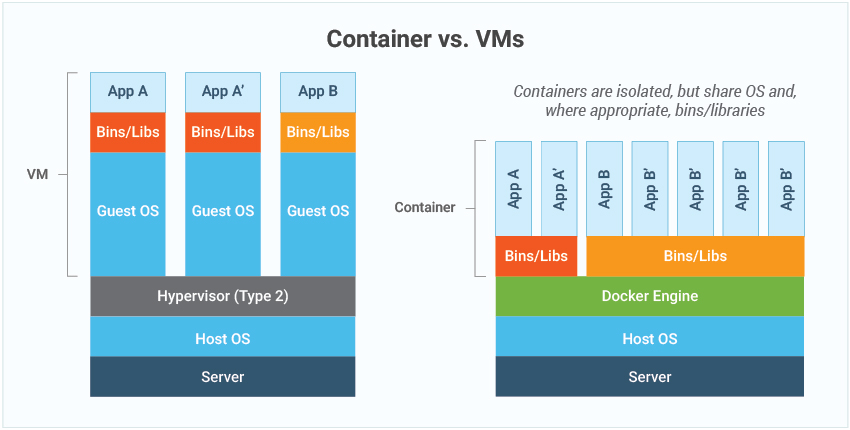
Containers vs Virtual Machines
A container is like a box where we put an application and everything it needs to run: code, tools, libraries, system dependencies and settings. Similar to Virtual Machines containers also use the host’s resources but they require less resources as a container doesn’t have a full fledged operating system but only the required parts of the operating system. As the OS is a part of the box(container) and lightweight(mostly in MBs) we can easily share this box with other machines and it works exactly the same whether on your laptop, a server or in the cloud irrespective of the host OS.
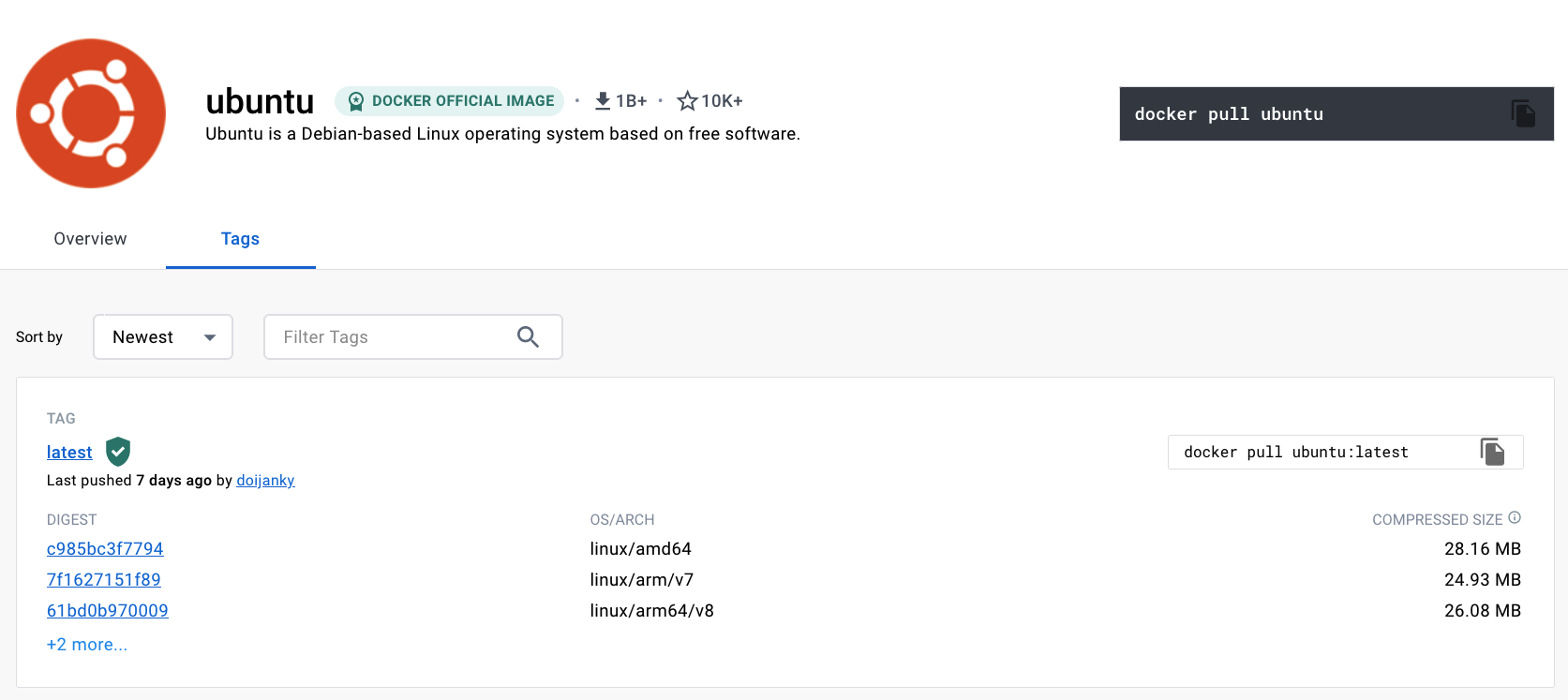
Below is the screenshot of official ubuntu base image which you can use for your container. It's just ~ 22 MB, isn't it very small ? on a contrary if you look at official ubuntu VM image it will be close to ~ 2.3 GB. So the container base image is almost 100 times less than VM image.
A Virtual Machine is like a whole house. It has its own rooms(OS) and utilities(hardware resources). You need a separate house for every new application. A container is like an apartment in a building. All apartments share common utilities (like electricity, water, equivalent to resources) but each has its own private space(application and software dependencies).
Why Containers?
Containers solve a lot of problems:
Portability: "It works on my machine!" No more of this excuse. Containers ensure apps run the same everywhere.
Efficiency: Containers share the host OS, so they’re faster and use fewer resources than VMs.
Scalability: Containers are lightweight. You can quickly create or destroy them based on demand.
Consistency: Developers can bundle everything needed to run the app into the container.
Dependency Conflicts: Different apps need different versions of the same tool. Containers isolate them to prevent conflicts.
Deployment Speed: With containers, you can deploy updates in seconds.
Cloud Adoption: Containers are perfect for modern cloud systems.
Real World Example
Imagine you’re building a website:
Without containers: You need to set up the same environment (specific OS, libraries, etc.) on every server where the website will run.
With containers: You create a container with everything bundled. Just copy the container wherever needed, and it works!
What is Docker?
We need hypervisors to create Virtual Machines. Similarly to work with containers, we need a container engine. Docker is a containerization platform that provides easy way to containerize your applications, which means, using Docker you can build container images, run the images to create containers and also push these containers to container regestries such as DockerHub. In simple words, you can understand as containerization is a concept or technology and Docker Implements Containerization.
Docker Architecture
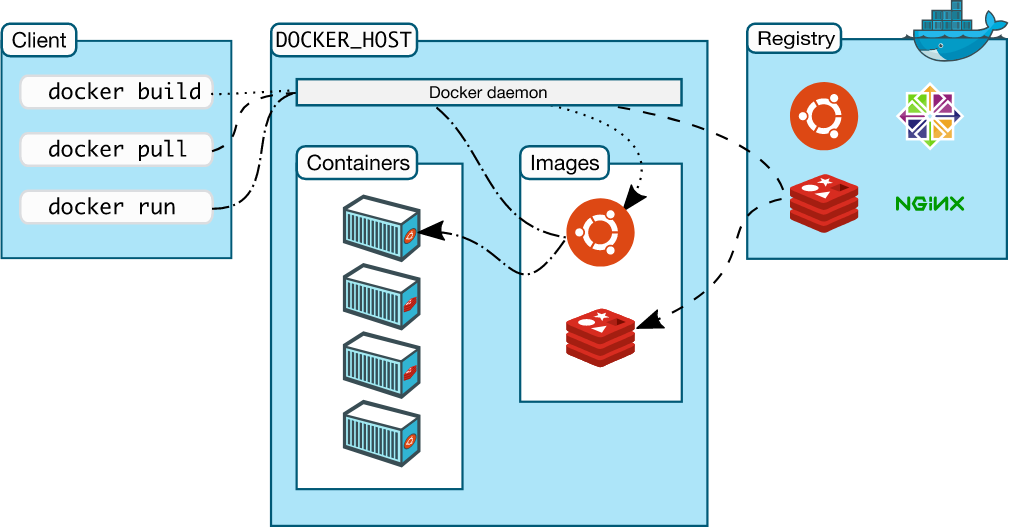
The above picture, clearly indicates that Docker Deamon is brain of Docker. If Docker Deamon is killed, stops working for some reasons, Docker is dead.
Key Components of Docker
Docker client
The Docker client (docker) is the primary way that many Docker users interact with Docker. When you use commands such as docker run, the client sends these commands to dockerd, which carries them out. The docker command uses the Docker API. The Docker client can communicate with more than one daemon.
Dockerfile:
This is like a step-by-step cookbook. It tells Docker how to build your image.Docker Images:
Think of an image as a recipe. It has all the instructions needed to create a container and prerequisites done. For example, a web app image may include Python, libraries, and your app’s code.Docker Containers:
A container is the ready-to-eat dish made from the image recipe. It’s a running instance of an image.Docker registries
A Docker registry stores Docker images. Docker Hub is a public registry that anyone can use, and Docker is configured to look for images on Docker Hub by default. You can even run your own private registry.
Docker Hub:
A cloud-based library where you can find and share Docker images. For example, you can pull images for popular software like MySQL or Nginx from Docker Hub.
Docker Lifecycle
There are three important things,
docker build -> builds docker images from Dockerfile
docker run -> runs container from docker images
docker push/pull -> push/pull the container image to/from public/private regestries to share the docker images.
Dockerfile
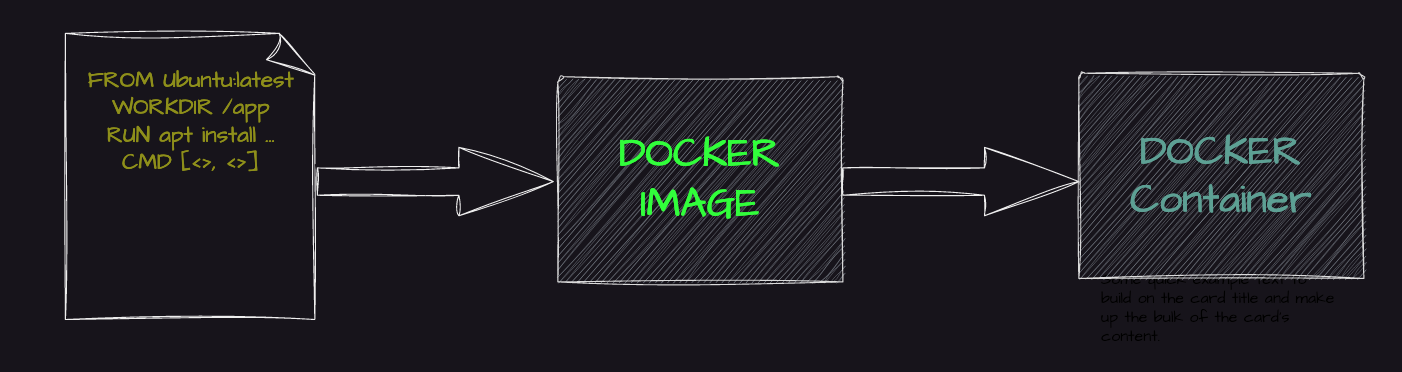
Dockerfile is a file where you provide the steps to build your Docker Image.
Images
An image is a read-only template with instructions for creating a Docker container. Often, an image is based on another image, with some additional customization. For example, you may build an image which is based on the ubuntu image, but installs the Apache web server and your application, as well as the configuration details needed to make your application run.
You might create your own images or you might only use those created by others and published in a registry. To build your own image, you create a Dockerfile with a simple syntax for defining the steps needed to create the image and run it. Each instruction in a Dockerfile creates a layer in the image. When you change the Dockerfile and rebuild the image, only those layers which have changed are rebuilt. This is part of what makes images so lightweight, small, and fast, when compared to other virtualization technologies.
Thanks to Abhishek Veeramalla for the guidance and resources.


